Guide · Technology
PHP2Shell: Can You Patch PHP 5 and 7 Without Moving to PHP 8?
Still running PHP 5/7, XAMPP or LAMPP? Here are the backport options, practical checks and limits of temporary PHP2Shell mitigations.
Event date: 2026-10-21

Remember the PHP security alert that sent website administrators checking their servers? The two identifiers are CVE-2026-109618 and CVE-2026-109619, often called PHP2Shell. PHP published its emergency announcement on 21 October 2026. This guide examines the available responses as of 15 November, particularly for older applications that cannot immediately move to another PHP branch.
The short answer: some environments can keep an older PHP branch by installing a vendor-patched runtime. Keeping the vulnerable binary and changing a few settings is a different situation. A patch fixes the PHP engine; a mitigation only blocks or makes certain attack paths harder to reach.
What is actually wrong?
Both issues concern memory management inside PHP, rather than one particular WordPress plugin. The first PHP advisory explains CVE-2026-109618: an allocation failure can interrupt processing before internal request state is ready, leaving cleanup code to use invalid state.
The second advisory covers CVE-2026-109619. A worker can retain references to request memory after it has been freed. A later request on the same worker may encounter that stale state. Under certain conditions, the result is unauthenticated remote code execution.
Updating a CMS or adding checks to an upload form does not automatically fix the runtime. PHP says web deployments need checking across multiple integration modes, including FPM, mod_php, CGI, FrankenPHP and LiteSpeed. Reachability depends on configuration, application behavior and the build; using FPM is not a reason to ignore the advisories.
PHP 8 needs checking too
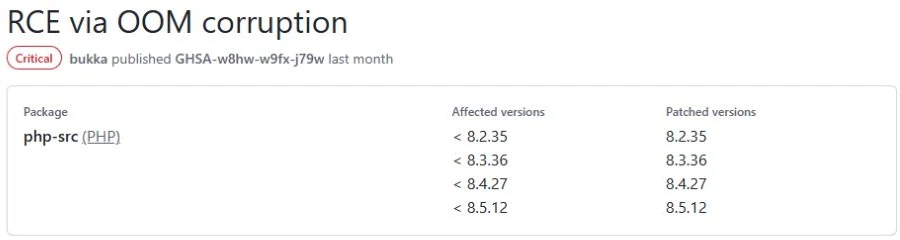
The upstream releases below fixed both CVEs on 21 October. These are the first fixed releases from that announcement, not a claim that they will always be the newest versions available.
| Upstream branch | Release containing both fixes |
|---|---|
| PHP 8.2 | 8.2.35 |
| PHP 8.3 | 8.3.36 |
| PHP 8.4 | 8.4.27 |
| PHP 8.5 | 8.5.12 |
For PHP 5/7, 8.0 and 8.1, vendor package status matters because these branches no longer receive routine upstream security releases. Identical-looking version numbers do not guarantee identical patch status. For example, Red Hat says its RHEL 7 PHP package is affected by CVE-2026-109619 but lacks the vulnerable code needed for CVE-2026-109618. Check the specific package rather than guessing from its major version.
First option: a backported package on the same branch
A backport brings a fix into an older branch. Your application might stay on PHP 7.4 while the runtime package moves to a vendor revision containing the patch. You still update a package, but you do not necessarily migrate to PHP 8.
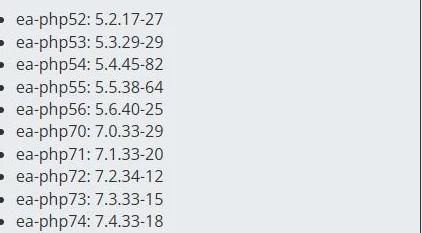
CloudLinux reports fixed packages for supported alt-php and ea-php branches, including several PHP 5 and 7 lines. Coverage depends on the operating system, repository, package family and service. alt-php, ea-php and the operating system’s own PHP are not interchangeable.
A concrete example from cPanel’s package table: cPanel EasyApache4 lists ea-php74 7.4.33-19, while CloudLinux EasyApache4 lists ea-php56 5.6.40-25 and ea-php74 7.4.33-18. These identify fixes in particular product lines. They are not instructions to install another vendor’s package or downgrade a newer patched build.
Long-term support providers offer other paths. TuxCare says supported product lines can receive PHP2Shell fixes without changing branches. Zend also lists fixed ZendPHP 7.2, 7.3 and 7.4 lines. Access and licensing depend on the provider; a fixed vendor product does not prove that an unrelated hosting binary is patched.
What if you build PHP yourself?
PHP’s announcement links minimal source backports for PHP 7.4, 8.0 and 8.1. These are intended for people who build and maintain their own runtime, not ready-made installers for every PHP 5/7 deployment.
Follow the official announcement to the matching branch. A team still needs to review the changes, rebuild, test the application and extensions, validate coverage for both CVEs, and replace every process using the old binary. Applying random patch fragments to a different source tree can produce an incomplete or incompatible build. On shared hosting, ask the provider to install a verified package; you normally do not control the server binary.
Cannot patch yet? Treat the two CVEs separately
CVE-2026-109619: reduce session and stale-state paths
Upstream recommends administratively disabling session.upload_progress.enabled to block demonstrated session paths. This feature tracks upload progress through sessions; turning it off does not disable ordinary sessions or all uploads. Native progress features depending on it will stop working. The following example is for an administrator-managed PHP-FPM pool and is not a complete patch:
; Temporary mitigation in the relevant PHP-FPM pool
; Validate configuration, then restart every worker
php_admin_flag[session.upload_progress.enabled] = off
Do not put this in application code as ini_set(). For a setting that must apply before request parsing, do not rely on FPM .user.ini. PHP 8.5 has the additional fatal_error_backtraces=0 option; that directive is not a PHP 5/7 setting. The advisory also suggests considering pm.max_requests=1 for FPM if the performance cost is acceptable. It limits FPM worker reuse, rather than providing a universal fix.
Remove per-request configuration that produces warnings before initialization, and address reachable fatal errors. Hiding messages with display_errors, error_reporting or @ does not remove the problematic state access. Except where a vendor documents a product-specific exception, disabling upload progress alone does not cover all CVE-2026-109619 variants.
CVE-2026-109618: be careful with memory_limit=-1
Setting memory_limit=-1 removes PHP’s per-request memory threshold that an attacker can deliberately trigger. However, an underlying allocation failure can still reach the vulnerable path. Upstream therefore describes this as incomplete mitigation, not evidence of a patched runtime.
Red Hat warns against removing that limit without an external availability boundary, such as an appropriately configured container or cgroup. Otherwise, an uncontrolled request can exhaust server memory. Do not substitute RLIMIT_AS or RLIMIT_DATA: they can cause the allocation failure involved in the vulnerability. This needs an operational plan, rather than a one-line setting pasted into any server.
Enforce appropriate frontend limits on decoded request size, input fields, multipart parts, headers and nesting depth. Raising memory_limit to a particular number, or merely lowering post_max_size, does not guarantee either issue is resolved. If the application never needs multipart input, upstream suggests blocking it before PHP. Check that legitimate forms and uploads still work.
A WAF helps, but the runtime still needs a patch
Microsoft describes Azure WAF mitigations as temporary coverage for specific attack patterns. Protection depends on the product and active rules, and rules can interfere with legitimate requests. Preventing direct access around the WAF and reviewing logs are operational tasks to plan while fixing the runtime.
Before calling the server patched
- Inventory every web runtime: version, vendor, full package revision, FPM pool/mod_php integration, containers and affected domains.
- Match both CVEs to packages from the correct repository. Ask your host for the full revision and its vendor advisory.
- Test updates with backups, important application flows and a recovery plan. Do not mix vendor ecosystems because version numbers look similar.
- Restart every worker that loads PHP. Red Hat emphasizes that a reload alone does not remove old worker state. Replace running containers with fixed images.
- Verify the actual web runtime. php -v and php --ini describe the CLI, which may differ from FPM or Apache. Do not leave public phpinfo() pages behind.
- Test login, sessions, uploads and background jobs; monitor errors and memory use after the change.
For shared hosting, a useful question is: “Does my web runtime contain the fixes for CVE-2026-109618 and CVE-2026-109619? Please provide the vendor, full package revision and confirmation that workers have been replaced.” A one-off scan or a short version label does not answer all of that.
Using XAMPP or LAMPP? Check the PHP actually serving your site
Think of XAMPP as a box containing Apache, PHP and a database. For these two CVEs, the PHP engine inside that box needs the fix. Replacing application files or updating WordPress does not repair it. LAMPP commonly means XAMPP for Linux under /opt/lampp. If you mean a LAMP stack installed from distribution packages, follow that distribution’s update channel instead.
1. Identify the installation and back it up
Record the installation folder, PHP version, Apache/FastCGI integration, architecture and required extensions. Use a web diagnostic page restricted to local access to check PHP’s version, Server API and Loaded Configuration File. The XAMPP Windows FAQ notes that the php.ini you edit may not be the one PHP loads. Remove the diagnostic page afterwards; do not expose it to the internet.
Before replacing a runtime, back up the project, php.ini, Apache and virtual-host configuration, and export your database. Try the change in a separate copy of the environment first. php -v helps identify the CLI, but it does not prove Apache is using the same binary.
2. Staying on PHP 5 or 7? Match the build carefully
PHP supplies minimal source backports for 7.4, 8.0 and 8.1. A source link does not guarantee that a patched old XAMPP installer exists. To stay on PHP 5/7, obtain a build that explicitly documents both CVE fixes, its origin and compatibility with your environment. Without a trusted package, someone must maintain and test a source build; no php.ini trick is equivalent to a complete patch.
On Windows, PHP’s manual requires a Thread Safe (TS) build when PHP runs as an Apache handler. Match x86/x64, the Apache module, Visual C++ runtime and extensions too. Replacing php.exe alone does not replace the PHP module loaded by Apache. Mixing old and new DLLs can prevent the service from starting. Since bundles differ, a “copy this one DLL” recipe is not a reliable general fix.
On Linux, XAMPP installs its own files under /opt/lampp. Updating a php package with apt or dnf does not prove that this bundled runtime changed. Check the paths and actual web runtime. The CloudLinux/cPanel packages above cannot simply be copied into LAMPP either. For a distribution-managed LAMP stack, use that distribution’s advisory and repositories.
If your application already supports a maintained branch, Apache Friends’ download page listed Windows XAMPP packages with PHP 8.3.36, 8.4.27 and 8.5.12 when checked on 15 November 2026. That is a migration option, separate from staying on PHP 5/7. Check current package contents and test the application; do not overwrite the old installation without backups.
3. A temporary setting to check while arranging the patch
For the session path in CVE-2026-109619, edit the php.ini actually loaded by the web runtime. Common locations are C:/xampp/php/php.ini on Windows and /opt/lampp/etc/php.ini on Linux; adjust for your installation. Back up the file, find this directive and make sure the active setting does not start with a semicolon:
; Temporary mitigation for session paths in CVE-2026-109619
; In the php.ini loaded by the web runtime
session.upload_progress.enabled = Off
In the Windows XAMPP Control Panel, stop Apache, confirm its service processes have exited, then start it again. For LAMPP, use the bundle’s service manager or Apache Friends’ documented stop/start commands. Plan downtime because other bundled services may also stop. Recheck the local diagnostics for an effective value of Off, then test login and uploads. This does not patch CVE-2026-109618 or cover every CVE-2026-109619 variant.
For local development, verify that access really is restricted to your own device. Typing localhost in the address bar does not prove that the port is closed to your LAN. Review bindings, firewall rules, port forwarding and tunnels that might expose the project. Apache Friends describes XAMPP as a development environment, so a public server needs more deliberate configuration. Avoid treating memory_limit=-1 as a quick recipe: its limits and memory risks are explained above.
A maintained backport can provide a compatibility bridge for an older application. It does not restore upstream support for every other problem in that PHP branch. If no trusted package or complete patch is available, reduce exposure while planning a move to a supported branch. Temporary settings should never be presented as proof that the runtime has been repaired.
Sources & references
- PHP.net — emergency announcement and source backports, 21 October 2026 ↗www.php.net
- PHP Security Advisory — CVE-2026-109618, OOM corruption ↗github.com
- PHP Security Advisory — CVE-2026-109619, stale global state ↗github.com
- cPanel — fixed EasyApache4 and CloudLinux package revisions ↗support.cpanel.net
- CloudLinux — PHP package status and WAF limitations ↗cloudlinux.com
- TuxCare — PHP2Shell backport FAQ ↗tuxcare.com
- Zend — CVE-2026-109619 and fixed product lines ↗www.zend.com
- Red Hat RHSB-2026-013 — product exceptions, mitigations and worker restarts ↗access.redhat.com
- Microsoft Azure Network Security — temporary WAF mitigations ↗techcommunity.microsoft.com
- PHP Manual — FPM pool configuration and pm.max_requests ↗www.php.net
- PHP Manual — Session Upload Progress ↗www.php.net
- Apache Friends — Windows XAMPP FAQ and Apache restarts ↗www.apachefriends.org
- Apache Friends — Linux/LAMPP FAQ, paths and service management ↗www.apachefriends.org
- PHP Manual — Apache on Windows and Thread Safe builds ↗www.php.net
- Apache Friends — available XAMPP packages at the time of checking ↗www.apachefriends.org