News · Technology
Windows 11 Previews Baseline Protection. What Does the New Check Mean?
Microsoft is testing Windows baseline protection to bring essential PC security checks into one status. It can show missing safeguards, but remains a preview.
Event date: 2026-11-17
You may have seen Secure Boot or memory integrity mentioned in Windows and wondered whether everything was actually enabled. Checking a PC's security can feel like working through several separate lists. Microsoft is testing a way to make the answer easier to understand.
On November 17, 2026, the company introduced Windows baseline protection in preview through the Windows Insider Program. It brings a set of foundational safeguards into a single status that users, IT administrators and applications can check. General availability is planned for 2027, so this is not something every PC already has.
One status covering several layers of protection
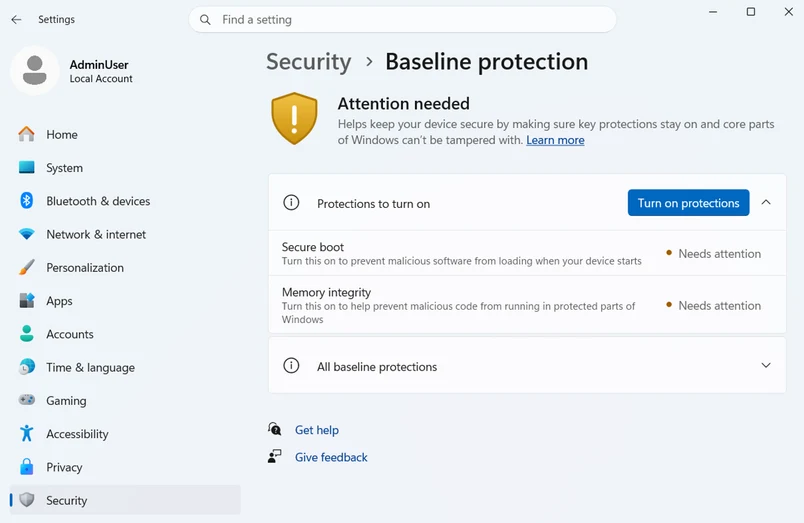
Windows checks whether the device meets every requirement in the defined baseline. If something is missing, the result says the device does not meet that baseline and provides details about what needs attention. That is more useful than a check mark with no explanation of what sits behind it.
The initial criteria cover a security processor, Secure Boot, virtualization-based security, memory integrity, and driver and kernel protections. These safeguards already exist in Windows. The new part is evaluating them together as one verifiable device security state.
What happens when a safeguard is missing?
In the preview experience Microsoft describes, Settings → Security → Baseline protection shows which requirements are not met. On personal or unmanaged PCs, Windows can offer steps to update missing protections, including a restart. When a firmware change is needed, the experience guides the user through it.
The release notes for Experimental Build 26340.10013 say the feature is rolling out gradually. A missing menu therefore does not necessarily mean something is wrong with your machine. On work devices, some fixes may instead need to be handled by IT under the organization's policies.
Can applications use the result?
Yes. Microsoft says developers can query baseline status and, where required, use hardware-backed evidence. An application then decides how to respond: display a warning, limit a feature or apply its own access policy.
This is not an announcement that every application will immediately reject a PC that misses the baseline. Windows supplies a device-state signal; applications and organizations decide how to use it. Meeting the baseline also does not make a computer immune to every threat.
What should regular users do for now?
Follow the preview through official sources while keeping Windows updates and existing protections in place. There is no need to change firmware just to chase a menu that has not rolled out to your device. If it is a company laptop, check with IT before changing security settings.
The useful idea behind baseline protection is its explanation: instead of stopping at a vague safe-or-unsafe label, it points to the safeguards that need work. The next question is how that experience develops as it moves towards general availability.
Sources & references
- Microsoft — Windows baseline protection, November 17, 2026 ↗techcommunity.microsoft.com
- Microsoft — Experimental Build 26340.10013, November 17 update ↗learn.microsoft.com