News · Technology
Windows 11 Updates Search With Actions Alongside Results
KB5132057 introduces updated Search and Windows 11 25H2/26H2 improvements. Explore the practical changes, accessibility updates and gradual feature rollout.
Event date: 2026-11-19
Need to change a simple setting, but first have to work through several menus? Updated Windows Search aims to shorten that journey. Microsoft released KB5132057 on November 19, 2026 for Windows 11 25H2 and 26H2, including the new search experience.
This is a non-security preview update, with builds 26200.10075 and 26300.10075. Here, preview refers to an optional Windows update release; it does not automatically mean you must move your PC to an Insider channel.
From finding a result to taking action
Microsoft introduced the design in October: easier-to-scan results, with simple actions available inside search. Examples include enabling dark mode, adjusting brightness or arranging windows, without first hunting for a Settings submenu.
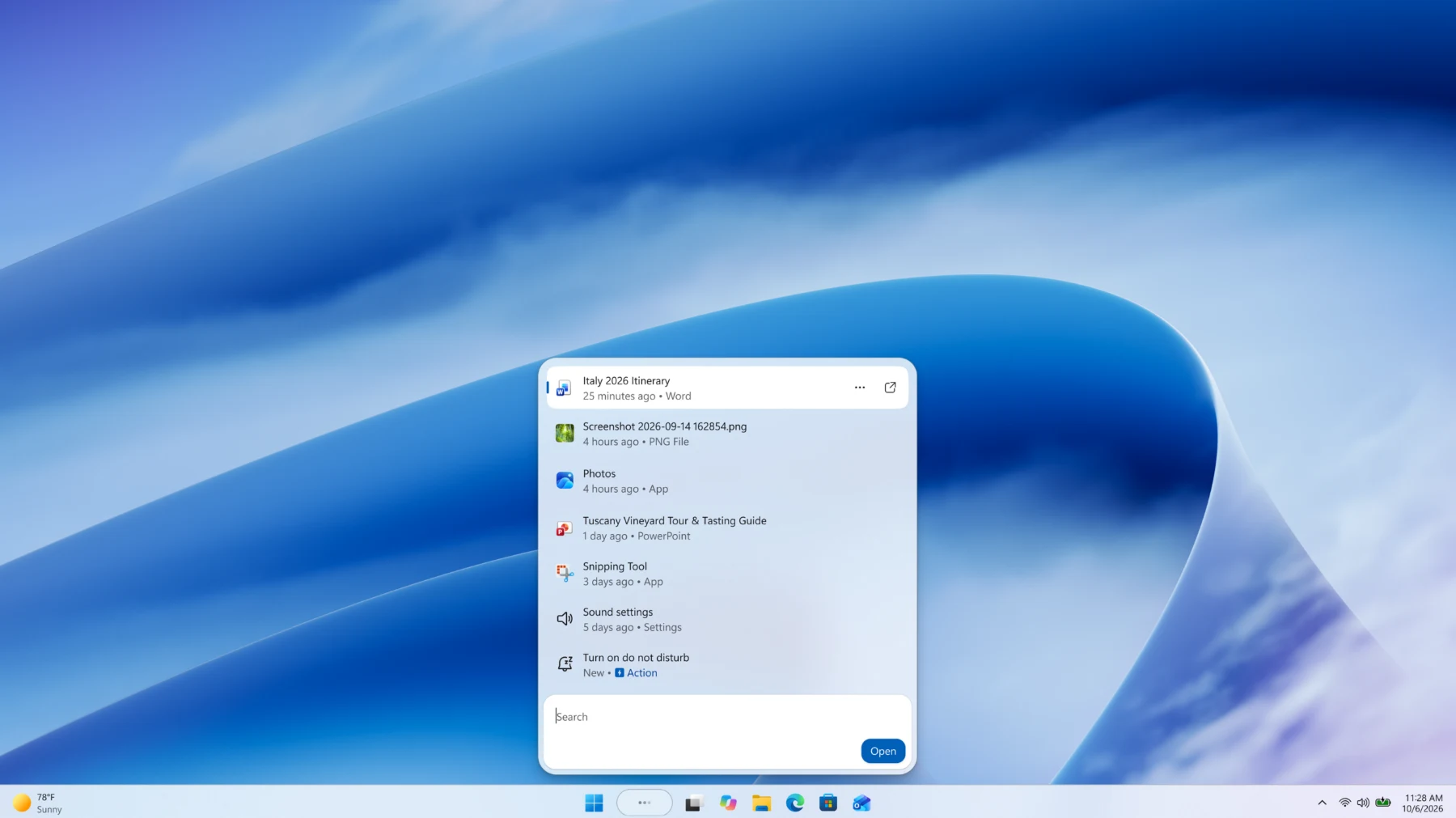
For everyday use, the appeal is the number of steps removed. There is a qualification: the initial experience was introduced in English with gradual rollout. Do not assume Indonesian commands or every action are immediately available on every PC.
Smaller changes that can matter every day
The KB notes also describe indexer-based search from This PC in File Explorer. Live captions gains a choice of system audio, microphone audio or both. Narrator expands mathematical reading to additional languages, including Indonesian.
A Pointer indicator helps locate the cursor, while the screen-capture border changes to red. Some readers may find these improvements more useful than a redesigned panel. Choose the function that addresses your own difficulty rather than changing every setting at once.
Updated already, but Search still looks the same?
Microsoft distinguishes gradual and normal rollout. Some features arrive in phases, so a newer build number does not guarantee every change is active on the same day. Availability still depends on the device and distribution stage.
Check Settings → Windows Update for the release offered to your PC and read the KB notes before choosing the preview. Follow IT policy on a managed work laptop. There is no need to force-enable features just to match a screenshot circulating online.
Start with one useful check: is the search you perform most often now easier to complete? That is a more practical measure of the update than simply watching the build number increase.
Sources & references
- Microsoft: KB5132057 preview, 19 November 2026 ↗support.microsoft.com
- Microsoft: New Windows Search design and actions ↗blogs.windows.com
- Microsoft Update Catalog: KB5132057 ↗www.catalog.update.microsoft.com